Standalone VR means the entire computer is built into the headset, so you strap it on and play with no gaming PC, no phone, and no cables running across the room. That’s standalone VR explained in one breath. Everything a headset needs to run games, the processor, the storage, the battery, the tracking, lives inside the thing on your face. You turn it on and you’re in VR.
I’ve played virtual reality at more than 50 real venues, and those places run on serious operator-grade rigs. At home, standalone headsets are the reason regular families like mine can have VR in the living room at all. No wiring a PC, no tripping over a tether, no calling tech support. Let me explain what standalone actually means, how it stacks up against PC-powered VR, and which ones are worth your money in 2026.
What “standalone” really means
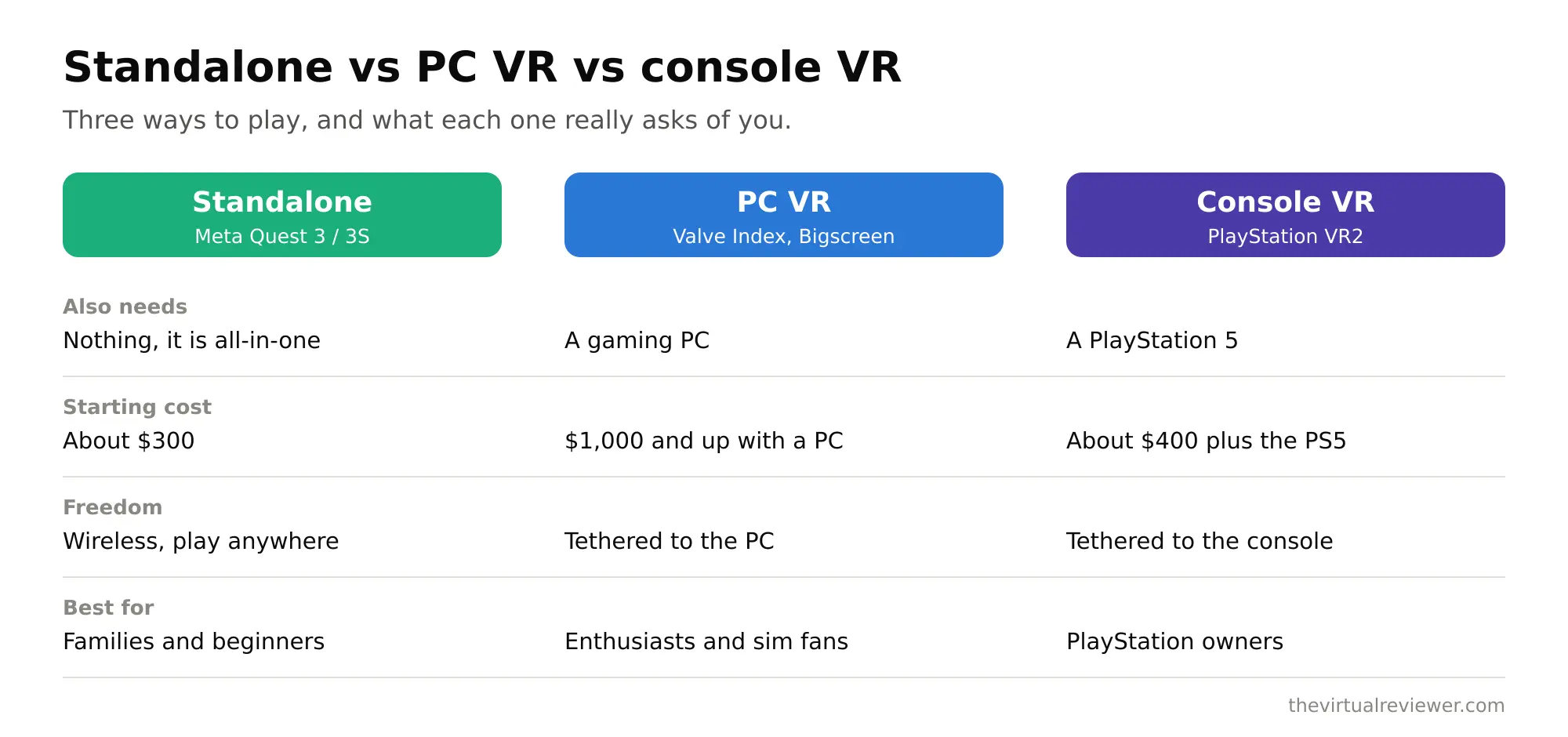
Think of a standalone headset as a smartphone for your face. It runs a mobile-style chip, it has its own operating system, it downloads apps from a store, and it holds a charge. When you launch a game, that game runs on the headset itself. Nothing else is plugged in.
Compare that to the old way. Early consumer VR needed a beefy gaming PC or a console, plus a thick cable connecting the headset to that machine, plus external sensors mounted around the room to track your movement. It worked, but it was a project. Standalone threw all of that out. The tracking cameras are on the headset, the computer is on the headset, and you can play in the backyard if you want.
Standalone VR vs PCVR at a glance
| Feature | Standalone VR | PC VR (tethered) |
|---|---|---|
| Computer | Built into the headset | Separate gaming PC required |
| Cables | None needed | Cable to PC, or wireless streaming |
| Setup | Put it on and go | Install software, connect, configure |
| Graphics ceiling | Mobile-chip level | As high as your PC allows |
| Cost to start | Just the headset | Headset plus a capable PC |
| Portability | Take it anywhere | Stays near the PC |
| Room sensors | None, cameras on headset | Some setups need external sensors |
The honest tradeoff is graphics. A standalone headset runs on a mobile chip, so the visuals are more like a good phone game than a top-tier PC title. PCVR can look dramatically sharper because it borrows the muscle of a full graphics card. But here’s the twist that makes standalone so popular: the best modern standalone headsets can also connect to a PC when you want that horsepower. So you get the easy, wireless, standalone experience most of the time, and you can plug into a PC for the demanding stuff. You aren’t locked into one or the other.
How a standalone headset works
A few pieces do the heavy lifting inside these headsets.
The chip. Most current standalone headsets, including the Meta Quest 3 and Quest 3S, run the Snapdragon XR2 Gen 2. That chip is what lets the headset render two eye views, track your hands and head, and process the passthrough cameras all at once. It is a big jump over the chip in older headsets, with roughly a 2.5 times graphics boost over the previous generation.
Inside-out tracking. Cameras on the outside of the headset watch the room and your controllers to figure out exactly where you are. This is called inside-out tracking, and it is the reason you do not need to mount sensors on your walls anymore. The Quest 3S even adds infrared illuminators so it can track your hands in a dark room.
The battery. Standalone freedom comes with a standalone limit: you are running on a battery. Most headsets give you roughly two to three hours per charge. That is plenty for a family game night, but it is the one place a tethered PC setup wins, since a cabled headset draws power constantly.
The best standalone headsets in 2026
The standalone market in 2026 is dominated by Meta, with a couple of solid alternatives.
Meta Quest 3. The higher-end mainstream pick. It has sharp pancake lenses at 2064 by 2208 per eye, the XR2 Gen 2 chip, and the best color passthrough for mixed reality. It is the one I point most families toward if the budget allows.
Meta Quest 3S. The value play. As of mid-2026 it runs $349.99 for the 128GB model and $449.99 for 256GB, after a price bump earlier in the year. It uses the same XR2 Gen 2 chip and does full color passthrough and mixed reality, but it uses older fresnel lenses at a lower 1832 by 1920 per eye, so the picture is a bit less crisp. For a first headset or for the kids, it is a lot of VR for the money.
Pico 4. The main non-Meta option in many regions. It has nice pancake lenses at 2160 by 2160 per eye, but it runs an older chip closer to the Quest 2’s, and its app library is smaller than Meta’s. It is a fine headset, just not as well supported.
The biggest practical difference between headsets isn’t always the spec sheet, it’s the app store. Meta’s library is the largest by a wide margin, and for a standalone headset the library is everything, because the headset is the whole system.
How standalone connects to the arcade
Here’s the lens I always come back to. When my family plays free-roam VR at a place like Sandbox VR or a big arena spot like Fixation VR, we’re wearing operator-grade backpack rigs and haptic vests inside a huge tracked space. That gear costs a fortune and needs staff to run it. You can’t buy that for your living room, and honestly you wouldn’t want to maintain it.
A standalone headset is the opposite philosophy. It trades the ceiling of that arcade tech for pure convenience. No backpack, no vest, no staff, no wires. It’ll never make you feel like you’re physically walking through a haunted spaceship the way a free-roam arena does. What it will do is let you have real VR ready in ten seconds, any night of the week, for the price of one arcade visit for the whole family. That’s why standalone won the home. It’s not the most powerful VR. It’s the VR you’ll actually use.
Who should buy standalone
Standalone is the right call for almost every family and casual player. You want it if you value grabbing the headset and playing without setup, if you don’t own a powerful gaming PC, if you want to bring VR to a friend’s house or on a trip, or if kids will be using it and you need something simple and self-contained. Go tethered PCVR only if you are a serious enthusiast chasing the sharpest possible graphics and you already own a strong gaming PC. And remember, the top standalone headsets can do both, so buying standalone doesn’t close the PCVR door.
FAQ
Do standalone VR headsets need a phone or PC to work?
No. That is the whole point of standalone. You may use a companion phone app for initial setup and buying games, but the headset runs everything on its own. Once it is set up you never need the phone to play.
Can a standalone headset also play PC VR games?
Yes, the leading ones can. The Quest 3 and 3S can connect to a gaming PC either with a cable or wirelessly to play PC VR titles. So you get standalone convenience plus an optional path to higher-end graphics if you own a capable PC.
How long does the battery last on standalone VR?
Expect roughly two to three hours of play per charge on most current headsets. A battery head strap can push that to four or five hours, and you can also play while plugged into a charger if you do not mind the cable.
Is standalone VR good enough for a first headset?
Absolutely, it is the best choice for a first headset. It is the cheapest way in, it is the simplest to set up, and it has the largest game library. Most people never feel the need for anything more powerful.
What is the difference between the Quest 3 and Quest 3S?
Both are standalone with the same chip and both do mixed reality. The Quest 3 has sharper pancake lenses and better passthrough. The 3S is cheaper with older lenses and a slightly softer image. The 3S is the value pick, the 3 is the quality pick.
The bottom line
Standalone VR explained simply: the computer is in the headset, so you skip the PC, the cables, and the wall sensors and just play. It trades top-end graphics for the kind of convenience that actually gets a headset used instead of sitting in a closet. It can’t replicate the free-roam, full-body magic of a real VR venue, but it brings genuine, ready-in-seconds VR into a normal living room. For most families, standalone isn’t the compromise. It’s the whole reason home VR finally makes sense. If you want to try the arcade version first, browse my venue reviews and city guides before you buy.